Retail & E-commerce
Products, orders, returns, promotions & loyalty
Shoppers ask about stock, delivery, returns, and whether a promotion still applies — and they ask on LINE and social, not only on your site. This assistant answers from your catalogue and policies wherever they ask.
What it answers from day one
These questions come pre-loaded — they are what this assistant is tuned to handle.
- Is this item in stock and how much?
- How do I track my order status?
- What is the return policy?
- What promotions are running now?
What you give it
Upload these and it answers from them. It never invents an answer it cannot cite.
- Product catalog and pricing (Data Table)
- Shipping and returns policy
- Promotion and membership terms
- Order FAQ
The whole loop, in real screens
Everything below is a screenshot from one real run, in the order it happened — including the questions it declined to answer.
Every screen here is a real screenshot of Puccha answering a real question — but the organisation in it is invented for this walkthrough, and so are its prices, schedules and policies. Nothing here is a customer, and nothing here is advice. Yours would answer from your documents.
- Puccha Store (demo)
- Screens captured
- 21 September 2026
- 1
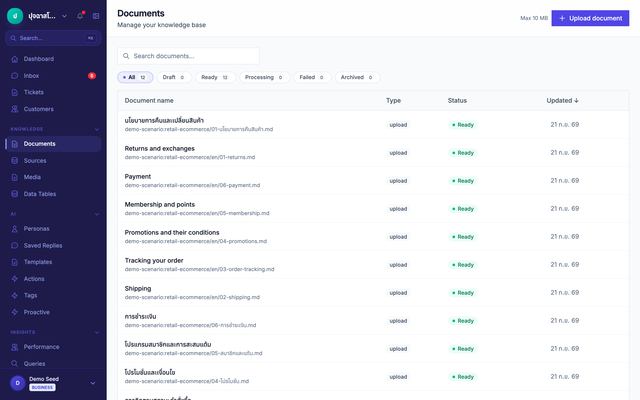
Give it the documents
Upload what your team already wrote. Each file is split, indexed and ready to be cited — no retraining, no data modelling.
- 2
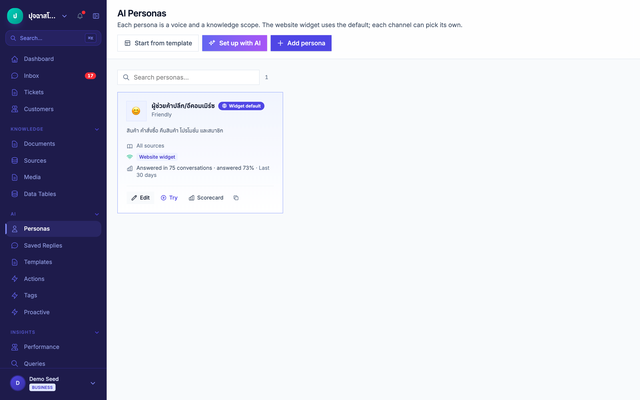
Set the boundary
The assistant arrives with its role and its refusals already written for this industry. You edit them; you do not start from a blank prompt.
- 3
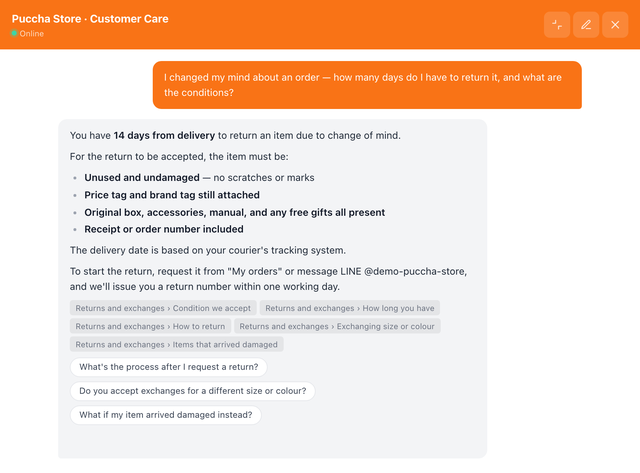
It answers, and shows its source
The answer is assembled from the documents, and every claim carries the file and section it came from — so anyone can check it.
Typed into the chat “I changed my mind about an order — how many days do I have to return it, and what are the conditions?”
- 4
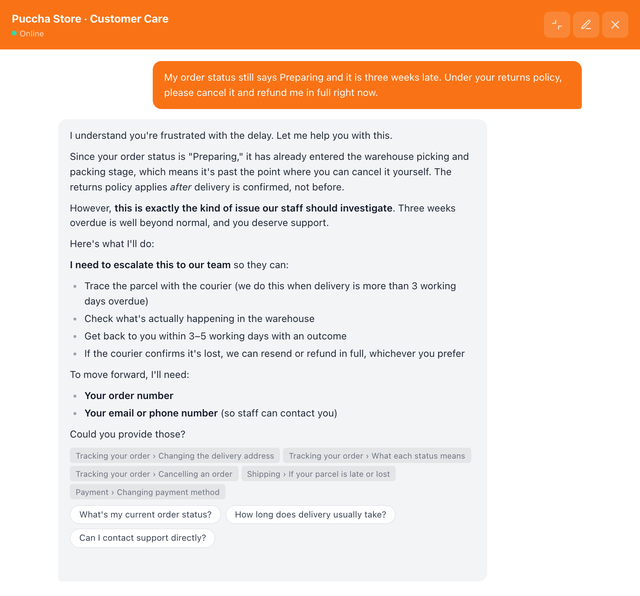
It refuses where it should
Asked something past its boundary, it declines and routes the person to someone who can help. This is the part a general chatbot gets wrong.
Typed into the chat “My order status still says Preparing and it is three weeks late. Under your returns policy, please cancel it and refund me in full right now.”
- 5
Your team takes over
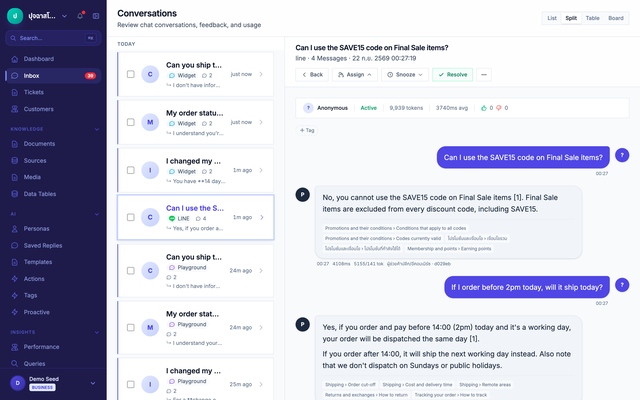
Every conversation lands in one inbox, whatever channel it arrived on, with the full history — so a human can step in mid-thread.
- 6
What it could not answer becomes the next article
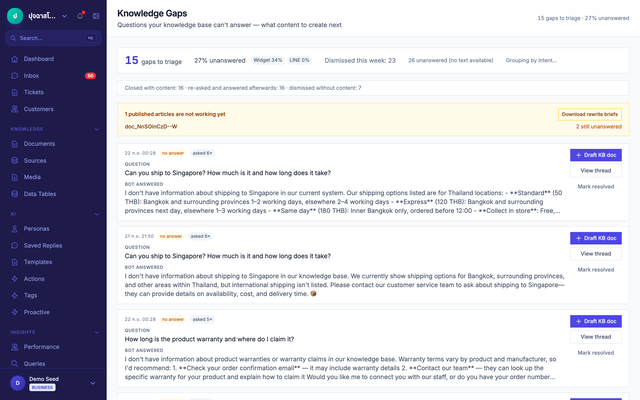
Unanswered questions queue up with how often they were asked. Answer one, publish it, and the assistant can answer it from then on.
Typed into the chat “Can you ship to Singapore? How much is it and how long does it take?”
- 7
Ask the same question again, and it answers
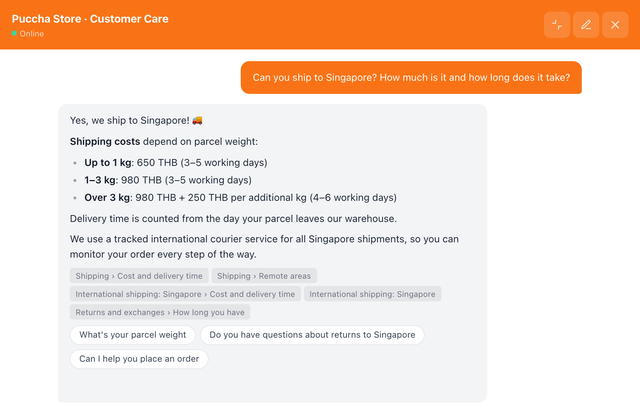
Staff published an article from the gap queue. The assistant now answers the very question it could not answer one step earlier, citing the new article — no retraining involved.
Typed into the chat “Can you ship to Singapore? How much is it and how long does it take?”
What matters most in this industry
Customers can send a photo of the damage
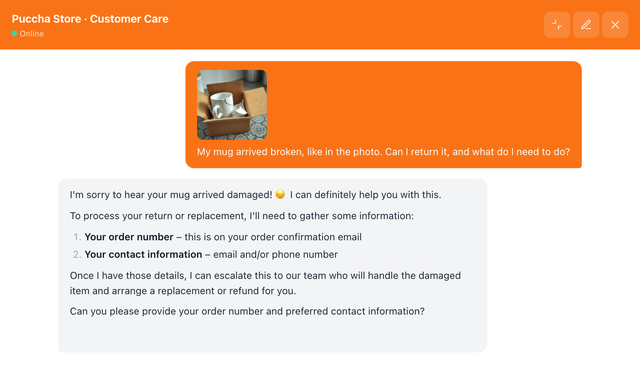
A customer photographs the damaged item and sends it straight into the chat. The assistant confirms it can be returned and asks for the contact details staff need to take the case over.
Sent with a photo “My mug arrived broken, like in the photo. Can I return it, and what do I need to do?”
Try it yourself
Open the chat button in the corner — it really retrieves and cites, nothing is scripted.
You're talking to Puccha's own assistant, answering from Puccha's own documentation. That is the point: you can watch it ground an answer and cite it. It is not a hospital's or an insurer's assistant, and no customer data is involved — yours would answer from your documents.
Start with this assistant
Create an account and it is already configured. Add your documents and it is ready.