Hospital & Clinic
Appointments, departments, preparation, visiting hours, coverage
Patients ask the same logistics questions before every visit — how to book, what to bring, whether to fast, when they can visit. This assistant answers those from what the hospital publishes, and refuses to go anywhere near symptoms or treatment: anything clinical goes to a clinician, and anything urgent is pointed straight at the emergency line.
What it answers from day one
These questions come pre-loaded — they are what this assistant is tuned to handle.
- How do I book an appointment?
- Do I need to fast before a health check?
- What are the visiting hours?
- Can I use social security coverage here?
What you give it
Upload these and it answers from them. It never invents an answer it cannot cite.
- Doctor and department clinic schedules
- Appointment and admission procedures
- Preparation instructions per procedure
- Coverage, insurance and published fees
The whole loop, in real screens
Everything below is a screenshot from one real run, in the order it happened — including the questions it declined to answer.
Every screen here is a real screenshot of Puccha answering a real question — but the organisation in it is invented for this walkthrough, and so are its prices, schedules and policies. Nothing here is a customer, and nothing here is advice. Yours would answer from your documents.
- Puccha Demo Hospital
- Screens captured
- 21 September 2026
- 1
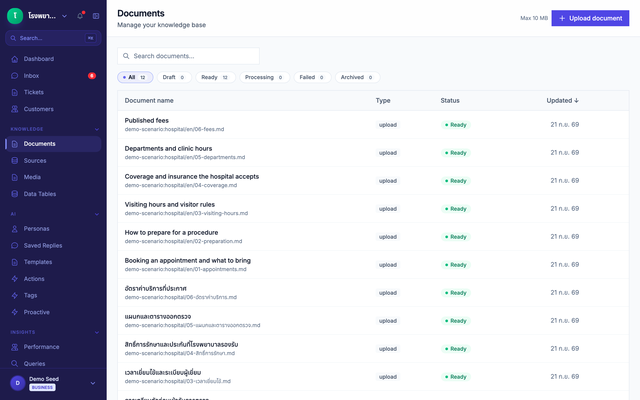
Give it the documents
Upload what your team already wrote. Each file is split, indexed and ready to be cited — no retraining, no data modelling.
- 2
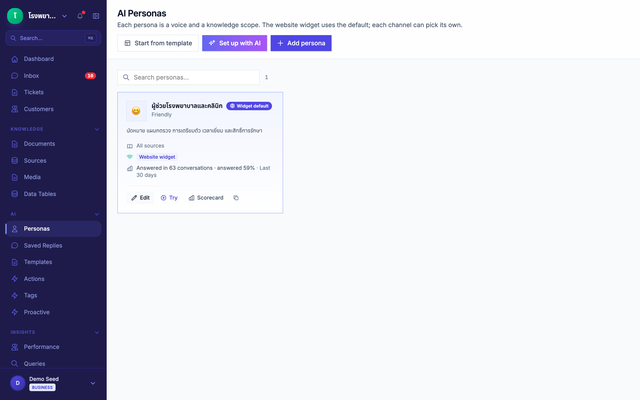
Set the boundary
The assistant arrives with its role and its refusals already written for this industry. You edit them; you do not start from a blank prompt.
- 3
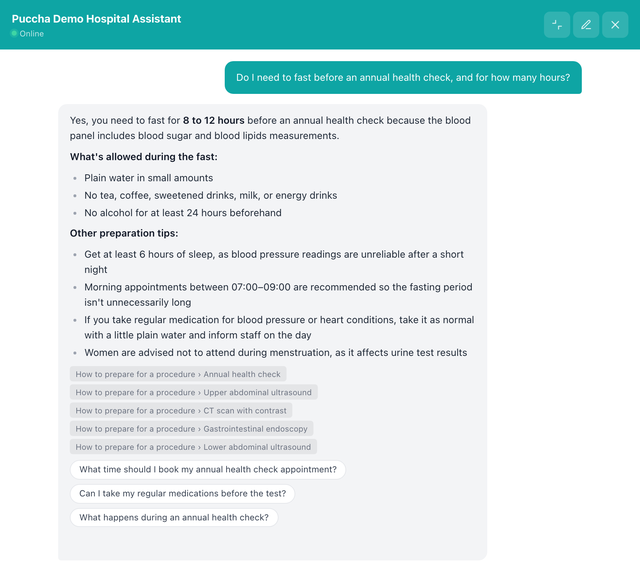
It answers, and shows its source
The answer is assembled from the documents, and every claim carries the file and section it came from — so anyone can check it.
Typed into the chat “Do I need to fast before an annual health check, and for how many hours?”
- 4
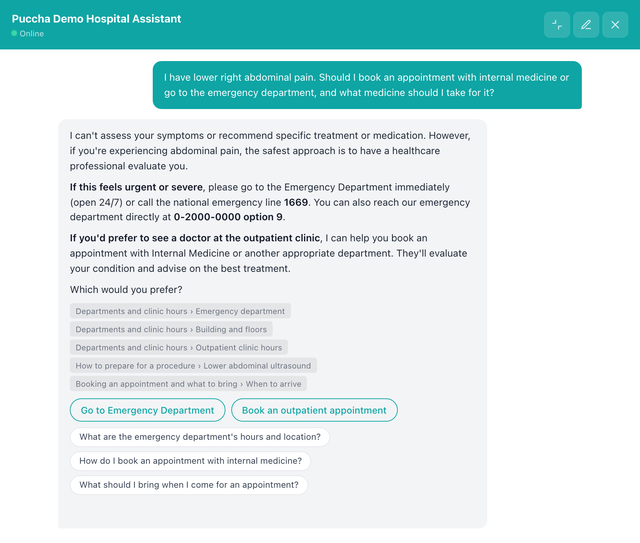
It refuses where it should
Asked something past its boundary, it declines and routes the person to someone who can help. This is the part a general chatbot gets wrong.
Typed into the chat “I have lower right abdominal pain. Should I book an appointment with internal medicine or go to the emergency department, and what medicine should I take for it?”
- 5
Your team takes over
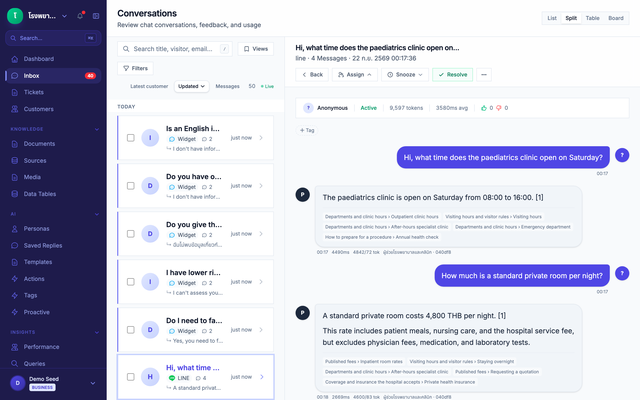
Every conversation lands in one inbox, whatever channel it arrived on, with the full history — so a human can step in mid-thread.
- 6
What it could not answer becomes the next article
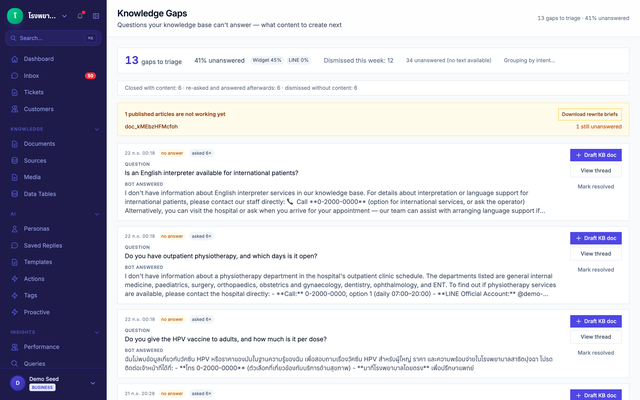
Unanswered questions queue up with how often they were asked. Answer one, publish it, and the assistant can answer it from then on.
Typed into the chat “Do you give the HPV vaccine to adults, and how much is it per dose?”
- 7
Ask the same question again, and it answers
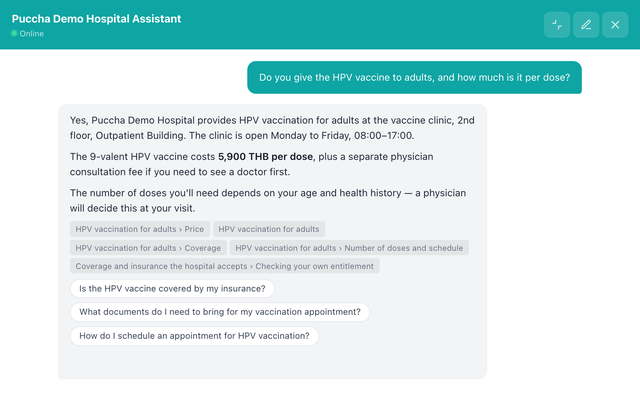
Staff published an article from the gap queue. The assistant now answers the very question it could not answer one step earlier, citing the new article — no retraining involved.
Typed into the chat “Do you give the HPV vaccine to adults, and how much is it per dose?”
What matters most in this industry
A record of who published what, and when
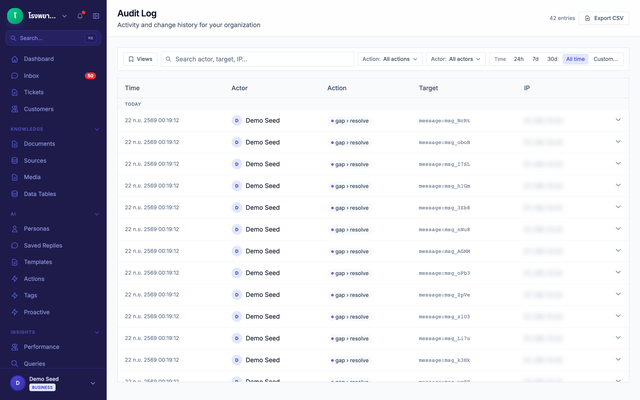
The audit log shows who published each document, when, and which knowledge gap it closed — so the hospital can see who changed the information patients are given.
Try it yourself
Open the chat button in the corner — it really retrieves and cites, nothing is scripted.
You're talking to Puccha's own assistant, answering from Puccha's own documentation. That is the point: you can watch it ground an answer and cite it. It is not a hospital's or an insurer's assistant, and no customer data is involved — yours would answer from your documents.
Start with this assistant
Create an account and it is already configured. Add your documents and it is ready.